
The Best Fluffy Pancakes recipe you will fall in love with. Full of tips and tricks to help you make the best pancakes.


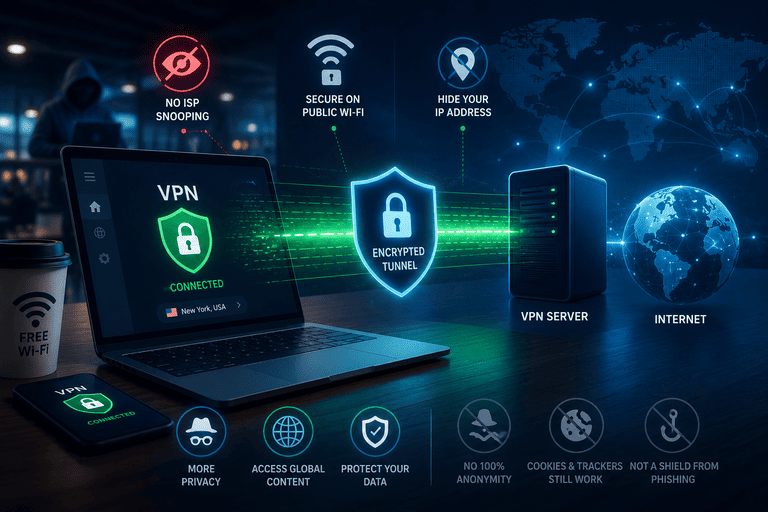
A VPN protects your privacy by creating an encrypted tunnel between your device and a VPN server. That means your internet provider, the owner of the Wi‑Fi network, and people snooping on the same network have a much harder time seeing what you do online. A VPN also hides your real IP address from the websites you visit and replaces it with the VPN server’s IP address. Source: Cloudflare
But a VPN is not magic. It improves privacy in specific places, and it has clear limits. It does not make you anonymous, it does not stop websites from tracking you with cookies if you stay logged in, and it does not protect you from phishing, malware, or fake websites by itself.
The short version
If you want the simplest answer, it is this:
- A VPN hides your traffic from your ISP and local Wi‑Fi owner.
- A VPN hides your home IP address from websites and apps.
- A VPN reduces some location-based profiling.
- A VPN does not stop account-based tracking, browser fingerprinting, scams, or bad passwords. Source: Mozilla
Quick infographic: who sees what?
CopyYOU
 │
 │ 1) Encrypted tunnel
 ▼
VPN SERVER
 │
 │ 2) Regular connection to website/app
 ▼
WEBSITE / APP

WITHOUT A VPN:
- ISP can see the sites/services you connect to
- Public Wi‑Fi owner may see connection details
- Website sees your real IP address

WITH A VPN:
- ISP sees that you connected to a VPN, but not the full browsing details
- Public Wi‑Fi owner mostly sees encrypted traffic
- Website sees the VPN server’s IP, not your home IP
- VPN provider becomes a party you must trust
What a VPN actually protects
1) It protects your traffic on local networks
When you use hotel, airport, café, or other shared Wi‑Fi, a VPN adds encryption between your device and the VPN server. That makes it much harder for someone on the same network to inspect your traffic. This is one of the oldest and most practical reasons to use a VPN.
That said, the privacy story is more nuanced today than many ads suggest. The U.S. FTC says public Wi‑Fi is usually safe now because most websites already use encryption. So a VPN still helps, but it is an extra privacy layer — not the only thing keeping you safe.
2) It hides your browsing from your ISP
Without a VPN, your internet provider can see a lot about where your traffic goes. With a VPN, your ISP still knows you are connected to a VPN, but it cannot easily inspect the same level of browsing activity inside the encrypted tunnel.
3) It hides your real IP address from websites
A VPN replaces your IP with the IP of the VPN server. This helps reduce direct location exposure and makes it harder for websites to tie activity to your home or office connection. It can also reduce some ad profiling that relies on IP data.
4) It can reduce censorship and location filtering
Because your traffic appears to come from the VPN server, a VPN can help you access services that are blocked or filtered on your local network or in your region. This is a privacy and access benefit, especially in restrictive environments.
What a VPN does not protect you from
A VPN does not make you invisible. If you are logged into Google, Facebook, Amazon, TikTok, or another account, those services can still know it is you. Cookies, trackers, browser fingerprinting, search history, and account activity still work unless you change those habits too.
A VPN also does not stop phishing. If you type your password into a fake website, the connection may be encrypted, but the scammer still gets your password. The FTC specifically warns that scammers can use encrypted websites too.
And a VPN is not a replacement for basic security. You still need software updates, strong passwords, two-factor authentication, and scam awareness.
Table: who can see what with and without a VPN
| Party | Without a VPN | With a VPN |
|---|---|---|
| ISP | Can see much more about your connections and browsing destinations | Sees that you use a VPN, but not the same full browsing details inside the tunnel |
| Public Wi‑Fi owner | May inspect connection details on the local network | Mostly sees encrypted traffic to the VPN |
| Website you visit | Sees your real IP address | Sees the VPN server’s IP address |
| VPN provider | Not involved | Can potentially see traffic metadata and becomes a party you must trust |
| Advertisers | Can still track you with cookies, logins, and fingerprinting | Can still track you with cookies, logins, and fingerprinting |
| Scammers / phishing sites | Can steal data if you give it to them | Can still steal data if you give it to them |
This is why the right mental model is simple: a VPN shifts trust. You hide more from your ISP and local network, but you now need to trust the VPN provider instead.
Statistics that matter
Here are a few practical numbers that help explain where VPNs fit today:
- Google’s Transparency Report shows only 0.5% unencrypted traffic to Google on both desktop and mobile, which means HTTPS is already doing a lot of heavy lifting for web security.
- As of May 3, 2026, the share of pages loaded over HTTPS in Chrome was 95% on Windows, 99% on Android, 99% on ChromeOS, 86% on Linux, and 98% on Mac. This is one reason public Wi‑Fi is generally safer than it used to be.
- Security.org reports that in its surveyed group, 29% used VPNs for personal reasons only, 24% for business only, 15% for both, and 32% reported no VPN use.
- The same source says nearly half of users used VPNs for general security, 40% for privacy, and about one-third for safer use on public Wi‑Fi.
What these stats mean: VPNs are useful, but the modern web is already heavily encrypted. So the best reason to use a VPN is not “the internet is totally unsafe without one.” The better reason is: a VPN gives you an extra privacy layer against ISPs, local networks, and IP-based exposure.
Professional guide: how to use a VPN for real privacy
1. Choose the right provider
Use this checklist before you subscribe:
- Look for a provider with a clear privacy policy.
- Prefer providers with independent security audits.
- Avoid exaggerated “total anonymity” marketing claims.
- Check whether the company explains how it makes money.
- Prefer modern protocols like WireGuard or OpenVPN.
- Avoid outdated protocols like PPTP.
2. Turn on the kill switch
A kill switch blocks internet traffic if the VPN connection drops. Without it, your device may suddenly reconnect through your normal connection and expose your real IP address. If privacy matters to you, keep the kill switch enabled.
3. Check for DNS and leak protection
A good VPN should route DNS requests through the VPN tunnel too. If DNS leaks outside the tunnel, your browsing requests may still be exposed. Good kill-switch design and leak protection reduce this risk.
4. Use nearby servers when possible
If privacy is your goal, choose a server close to your location. You usually get better speed and fewer connection problems. Use distant servers only when you need a different location. Slow performance is a common downside of VPNs.
5. Combine a VPN with better privacy habits
A VPN works best with:
- a privacy-focused browser
- tracker blocking
- strong unique passwords
- two-factor authentication
- regular software updates
- logging out of accounts you do not need
- avoiding suspicious links and fake websites
Best use cases for a VPN
A VPN is most useful when:
- you use public or shared Wi‑Fi often
- you want to hide browsing activity from your ISP
- you want to hide your home IP from websites and apps
- you work remotely and need secure network access
- you want a little more privacy while traveling
A VPN is less useful if you think it will:
- make you anonymous
- stop all tracking
- protect weak passwords
- stop phishing or malware
- replace HTTPS, antivirus, or account security
Common mistakes to avoid
- Using a “free” VPN without understanding its business model
- Leaving the kill switch off
- Staying logged into every major account while expecting anonymity
- Ignoring browser cookies and trackers
- Using outdated VPN protocols
- Thinking a VPN makes scam websites safe
- Forgetting updates, 2FA, and password hygiene
FAQ
Does a VPN make me anonymous?
No. A VPN improves privacy, but it does not make you anonymous. Websites can still identify you through accounts, cookies, fingerprinting, and other signals.
Can my ISP see what I do if I use a VPN?
Your ISP can usually see that you are connected to a VPN, but it cannot see the same detailed browsing activity inside the encrypted VPN tunnel.
Does a VPN protect me on public Wi‑Fi?
Yes, it adds protection by encrypting traffic between your device and the VPN server. But remember: today, many websites already use HTTPS, so public Wi‑Fi is usually safer than it used to be. A VPN is still a useful extra layer.
Can a VPN stop hackers?
Not by itself. It helps in some network situations, but it does not stop phishing, malware, or password theft. You still need updates, strong passwords, and 2FA.
Should I use a free VPN?
Be very careful. The main question is how the provider makes money. If the business model is unclear, your data may be the product. Transparency and independent audits matter.
Is a VPN enough for privacy?
No. Think of a VPN as one layer. Real privacy comes from combining it with safer browsing, fewer trackers, good account security, and careful online behavior.
Final takeaway
A VPN protects your privacy in a practical, limited, and useful way. It encrypts your connection to the VPN server, hides more of your traffic from your ISP and local network, and masks your real IP address from websites. But it does not make you anonymous, and it does not replace good security habits. The smartest way to use a VPN is to treat it as one strong privacy layer inside a bigger privacy setup.
An interesting discussion is definitely worth comment.
There’s no doubt that that you should publish more on this topic, it
might not be a taboo matter but generally
folks don’t talk about such issues. To the next!
Best wishes!!